
Boosting Cell Signal in an RV
April 14, 2026 · By Magnolia RV Park
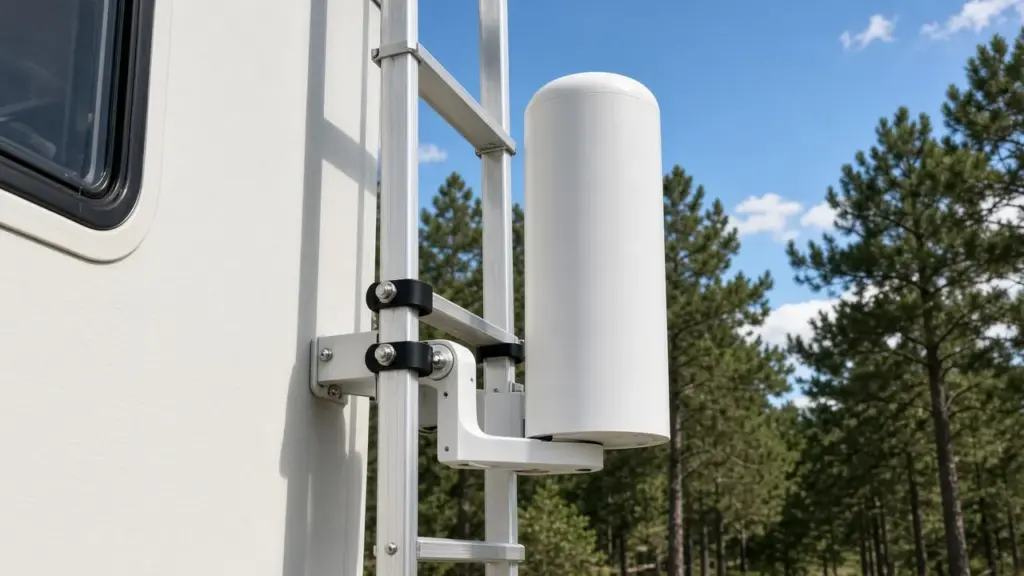
Weak cell signal can make RV life frustrating. Dropped calls, slow hotspots, and failed video meetings are common complaints, especially in rural or wooded areas. RVs themselves can block signal, since metal frames and walls interfere with radio waves. Fortunately, there are practical ways to improve your connection without major expense.
This guide explains how to boost cell signal in an RV. For a broader comparison of internet options, see our post on cellular hotspots, satellite, and park Wi-Fi, and for the bigger picture on utilities, our pillar on RV hookups explained for long stays.
Why Signal Is Weak in an RV
Several factors affect signal inside an RV. Metal framing, aluminum siding, and reflective windows block radio signals. Distance from the nearest tower weakens signal. Trees, hills, and buildings can obstruct the path. Network congestion at busy times can slow data even when bars look fine. Covered sites can also affect signal, since metal roofs above your RV may block some reception.
Measure Your Signal First
Before buying equipment, measure your signal. Many phones can display signal strength in decibels in a field test mode or through a signal app. Walk around inside and outside your RV to find where signal is strongest. Note which carrier performs best at your site. Measuring gives you a baseline and helps you decide what will actually help.
Try Simple Fixes First
Sometimes simple changes make a big difference. Move your phone or hotspot near a window facing the nearest tower. Raise it higher, such as on a shelf near the ceiling. Keep devices away from metal surfaces and appliances. Restart devices occasionally to reconnect to the best tower. Switch between network modes if your device allows it.
Choose the Right Carrier
Coverage varies by carrier and location. If one carrier is weak at your site, another may be strong. Some residents keep a second line or hotspot on a different carrier for backup. Ask neighbors which carriers work best at the park.
Cellular Signal Boosters
Signal boosters use an outside antenna to capture signal, amplify it, and rebroadcast it inside your RV. A typical kit includes an exterior antenna, an amplifier, and an interior antenna. Boosters work best when there is some usable signal outside to amplify. They cannot create signal where none exists.
Before mounting any exterior antenna, check with management. Park rules may limit what can be attached outside your RV or placed on your site. At Magnolia’s Finest, items on or under the site are not allowed, so discuss equipment in advance.
External Antennas and Routers
Some residents use cellular routers with external antennas instead of boosters. These connect directly to the network and create a Wi-Fi network inside the RV. They can offer strong performance for data, especially for remote workers.
Power Use
Boosters and routers draw power continuously. Plan for their power use in your electrical budget. Never run cords from other sites to power equipment; that is not allowed at our park.
Wi-Fi Calling
If you have a good internet connection, Wi-Fi calling can improve voice calls when cell signal is weak. Enable it in your phone settings.
Placement of Interior Equipment
Place interior antennas and routers centrally or near where you use devices most. Avoid placing them near microwaves or other electronics that can cause interference.
Heat and Equipment
Electronics can overheat in hot RVs. Keep equipment out of direct sun and ensure airflow. Window coverings help keep interiors cool; our post on window coverings and insulation for RV heat control explains how.
Keeping Things Tidy
Cables and equipment can create clutter. Route cables neatly along walls and secure equipment so it does not fall. Keep equipment away from water sources, including sinks and your drinking water setup. Our post on drinking water hoses and filters for RVs covers keeping water systems clean and separate.
Storms and Outages
Storms can knock out towers or power. Keep devices charged and have a backup plan for important calls. A battery-powered weather radio provides alerts when cell service is spotty.
Confirming Park Internet
Internet options at Magnolia’s Finest should be confirmed directly with the park. Call or text us at (281) 205-1959 to ask about your site.
Cleaning and Care
Keep equipment clean and dust-free. When cleaning around devices, use appropriate products and avoid spraying liquids. Our post on septic-safe toilet paper and cleaning products for RVs covers choosing cleaning products that are safe for your RV systems.
Signal and Seasonal Changes
Signal can change through the year. Leaves on trees in spring and summer can weaken signal compared with winter, when some trees are bare. Heavy rain and humidity can affect reception slightly. Network congestion can increase during holidays, local events, or storms when many people are online at once. If your signal suddenly worsens, check whether conditions have changed before assuming equipment has failed. Re-measure your signal every few months to see how it varies.
When to Get Help
If you depend on a strong connection for work and simple fixes are not enough, consider consulting a specialist who works with RV connectivity. They can recommend equipment suited to your location and needs. Many residents find that investing in the right setup pays for itself in reduced frustration and fewer missed calls.
Understanding Signal Bars
Signal bars on your phone can be misleading. Two phones side by side may show different bars, and bars do not always reflect data speed. A connection with strong signal can still be slow if the tower is congested. Running a speed test gives a better picture of real performance. Test at different times of day, since evenings are often busier on cellular networks. Knowing your actual speeds helps you decide whether you need a booster, a different carrier, or simply a better device location.
Choosing Devices With Good Antennas
Not all phones and hotspots perform equally. Some devices have better built-in antennas and support more network bands than others. If you rely heavily on cellular data, research devices known for strong reception. A dedicated hotspot or router often outperforms a phone used as a hotspot, and some models allow external antennas to be connected directly.
Managing Data Use
Even with good signal, data plans may slow after a certain amount of use. Monitor your data, schedule large updates for off-peak times, and adjust streaming quality when needed.
Asking Neighbors
Neighbors at the park often know which carriers and setups work best on site. A quick conversation can save you time and money.
Frequently Asked Questions
Will a signal booster work if I have no signal at all?
No. Boosters amplify existing signal. They need some usable signal outside to work.
Can I mount an antenna on my RV at Magnolia’s Finest?
Check with management before mounting equipment. Items on or under the site are not allowed.
Does the park provide internet?
Internet options should be confirmed directly with the park.
What is the easiest way to improve signal?
Move your phone or hotspot near a window facing the nearest tower and away from metal surfaces.
Stay Connected in Magnolia
Magnolia’s Finest RV Park is a small, gated long-term community. Read the FAQ, explore our amenities, or check availability.
Check Availability or call or text (281) 205-1959
Magnolia’s Finest RV Park · 32020 Old Hempstead Rd, Magnolia, TX 77355 · Contact us