TV Options for RV Living: Antenna, Streaming, and Satellite
April 27, 2026 · By Magnolia RV Park
For many full-time RV residents, watching TV is part of winding down after work. Fortunately, there are more ways than ever to watch shows, news, and sports from an RV. The three main options are an over-the-air antenna, streaming over the internet, and satellite service. Each has strengths, costs, and limitations, and the right choice depends on how you watch, where you live, and your budget.
This guide compares TV options for long-term RV living and offers tips for choosing a setup that works at a park like ours. For background on the utilities side of RV life, start with our pillar, RV Hookups Explained.
Option 1: Over-the-Air Antenna
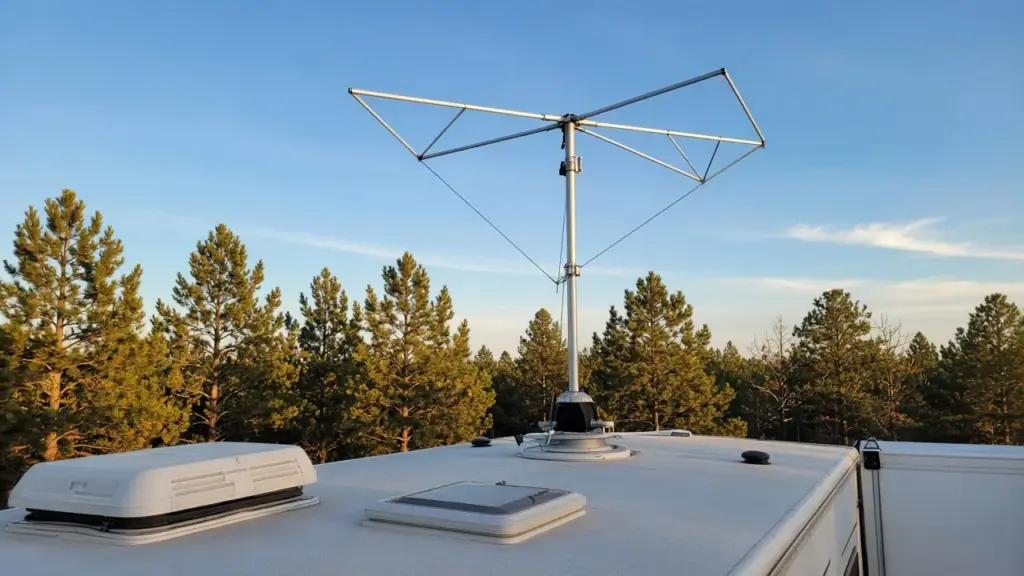
Many RVs come with a built-in antenna on the roof, and others can add one. An antenna picks up free broadcast channels from local TV stations.
Pros
- Free to use. Once you have an antenna, there is no monthly fee.
- Local news and weather. Broadcast channels provide local coverage, which is especially valuable during severe weather and hurricane season.
- No data usage. Antenna TV does not use your internet plan.
- Good picture quality. Digital broadcast signals can look excellent when reception is strong.
Cons
- Channel selection is limited to what stations broadcast in your area.
- Reception varies based on distance from towers, terrain, trees, and weather.
- You may need to rescan channels after moving or adjusting the antenna.
Tips
Run a channel scan on your TV after arriving at your site. If reception is weak, try adjusting the antenna direction and rescanning. Some residents add an amplifier to improve weak signals. Because Magnolia is northwest of Houston, many residents point antennas toward the Houston area, but results vary by site and equipment.
Option 2: Streaming
Streaming has become the most popular way many people watch TV. Services deliver shows, movies, live TV, and sports over the internet to a smart TV, streaming stick, or device.
Pros
- Huge selection of on-demand shows and movies.
- Live TV services offer channel lineups similar to cable.
- Flexible subscriptions that you can start and stop.
- Portable. Your services go with you wherever you have internet.
Cons
- Uses a lot of data. High-definition streaming can consume several gigabytes per hour.
- Depends on internet quality. Slow or unreliable connections cause buffering.
- Costs add up when you subscribe to multiple services.
Tips
Check your data plan carefully. If you use a cellular hotspot, confirm whether it has a data cap or slows down after a certain amount of usage. Lowering streaming quality in your app settings reduces data use. Download shows over a strong connection when possible, so you can watch offline later.
Internet service is confirmed per site at our park, so ask about your site before relying on streaming. Our post on cellular hotspots, satellite, and park Wi-Fi compares internet options, and our guide to boosting cell signal in an RV can help if your connection is weak.
Option 3: Satellite TV
Satellite TV uses a dish to receive signals from satellites and offers channel packages similar to cable.
Pros
- Works in many locations where there is a clear view of the southern sky.
- Wide channel selection, including sports and premium channels.
- Does not use internet data for traditional satellite TV.
Cons
- Requires a clear line of sight to the satellite. Trees and covered sites can block the signal.
- Equipment costs for a dish and receiver.
- Monthly subscription fees can be higher than streaming.
- Weather can interrupt service during heavy storms.
Tips
Roof-mounted automatic dishes are convenient because they aim themselves. Portable dishes on tripods are another option, but they need space on the ground. At our park, items cannot be stored on or under the site, so check with management before setting up any equipment outside your RV. On covered sites, a roof dish may have limited sky view, so ask about your specific site.
Comparing the Options
| Option | Monthly cost | Data use | Local channels | Best for |
|—|—|—|—|—|
| Antenna | None | None | Yes | Local news, weather, budget viewers |
| Streaming | Varies | High | Some services | On-demand and flexible viewing |
| Satellite | Higher | None | Depends on plan | Sports and large channel packages |
Many residents combine options. An antenna for local channels plus one or two streaming services covers most viewing needs at a reasonable cost.
Setting Up Your TV Space
In a small RV, your TV setup should be secure and tidy. Use a sturdy mount or secure the TV so it does not shift. Manage cables with clips or ties to reduce clutter and tripping hazards. If you move the RV, secure or remove the TV first.
Be mindful of electrical use. TVs and streaming devices use little power compared to air conditioners, but large setups with sound systems add up. Electric service is confirmed per site.
Keep volume considerate, especially during quiet hours from 8 pm to 8 am. RV walls are thin, and sound carries in a small park. Headphones are a great option for late-night viewing.
Planning for Severe Weather
During storms and hurricane season, which runs from June 1 to November 30, local broadcast channels are an important source of emergency information. Even if you mostly stream, an antenna provides a backup when internet service goes down. A battery-powered weather radio is another good backup. Our post on packing an RV for a three- to six-month job includes other essentials worth keeping on hand.
Choosing What Works for You
Think about what you actually watch. If you mostly want local news and a few network shows, an antenna may be enough. If you binge series and movies, streaming makes sense. If live sports and large channel packages matter most, satellite may be worth the cost.
Start simple. You can always add a service later once you know how reception and internet work at your site.
Keeping Cables and Connections Safe
Whatever option you choose, keep connections safe and tidy. Coaxial cables and power cords should not create tripping hazards inside the RV or run across the ground outside. Cords may not be run from other sites at our park, and hookups should never be tampered with. If you notice a problem with a park-provided connection, report it to management rather than trying to fix it yourself.
Inside the RV, avoid pinching cables in slide-outs or doors, and check connections periodically for wear. A loose coaxial connection can cause poor antenna reception, and a damaged power cord can be a fire hazard. Keeping everything organized also makes it easier to troubleshoot when something stops working.
Entertainment Beyond the Screen
TV is only one way to relax. Many residents enjoy books, podcasts, music, and hobbies that do not need a screen or a data plan. Magnolia is also close to outdoor destinations like W.G. Jones State Forest, Lake Conroe, and Sam Houston National Forest, and the Texas Renaissance Festival in Todd Mission draws visitors every fall. A mix of screen time and time outdoors helps a small space feel less confining over a long stay.
Frequently Asked Questions
Can I watch local channels in an RV?
Yes. An over-the-air antenna can pick up free local broadcast channels when reception is good.
How much data does streaming use?
High-definition streaming can use several gigabytes per hour. Lower the quality setting to reduce data use.
Does satellite TV work on covered sites?
It may be limited, since the dish needs a clear view of the sky. Ask management about your specific site.
Does the park provide TV or internet?
Utilities and internet are confirmed per site. Call or text (281) 205-1959 to ask.
Can I set up a satellite dish on the ground?
Check with management first. Items cannot be stored on or under the site at our park.
Settle In at Magnolia’s Finest
Magnolia’s Finest RV Park is a small, gated long-term community in Magnolia, TX. See our amenities, read the FAQ, or check availability.
Check Availability or call or text (281) 205-1959
Magnolia’s Finest RV Park · 32020 Old Hempstead Rd, Magnolia, TX 77355 · Contact us